




Growing businesses are asking more of their IT.
That makes sense. Cloud services now sit behind everyday operations. Cybersecurity touches almost every technology decision. AI has added a new set of questions around data, access, governance, and value. And as businesses add people, applications, devices, and locations, there is simply more technology to manage.
Those pressures are helping drive demand for managed IT services, particularly as businesses look for outside expertise to manage increasingly complex IT environments.
But heading into 2027, the more interesting question isn’t how much managed IT businesses are buying. It’s what they should expect to get from it.
Fast support still matters. So does keeping systems available and employees productive. But for a growing business, managed IT should also bring a clearer view of what’s coming next: where to invest, what to improve, which risks to address, and how today’s technology decisions fit where the business wants to be 12 months from now.
So, what should managed IT look like when you move beyond the support desk?
IT support is the starting point

Something breaks. Someone needs access. A laptop refuses to cooperate five minutes before an important meeting.
Yes, you need someone who can fix it.
Responsive IT support is an important part of managed IT services, but as a business grows, more of the important technology conversations happen before something goes wrong.
- A new hire isn't only another support user. They may need hardware, Microsoft 365 licensing, access to applications and data, security policies, and a reliable onboarding process.
- A new application may solve one problem while adding another subscription, another vendor, another login, and another place where company data lives.
- An AI project can open up useful opportunities, but it can also raise questions about permissions, information governance, security, and whether the use case is worth the investment in the first place.
These are good problems to have. They usually mean the business is moving, hiring, investing, or trying something new. The job of managed IT is to make sure the technology can keep up.
A 12-month roadmap puts those decisions in one place, so you can prioritize what matters now, what can wait, and what the business needs to budget for next.
The 12-month roadmap
Use this structure as a starting point and replace the examples with priorities that fit your business. Each quarter has a focus, a handful of practical projects, and a clear way to tell whether the work achieved what it was supposed to.
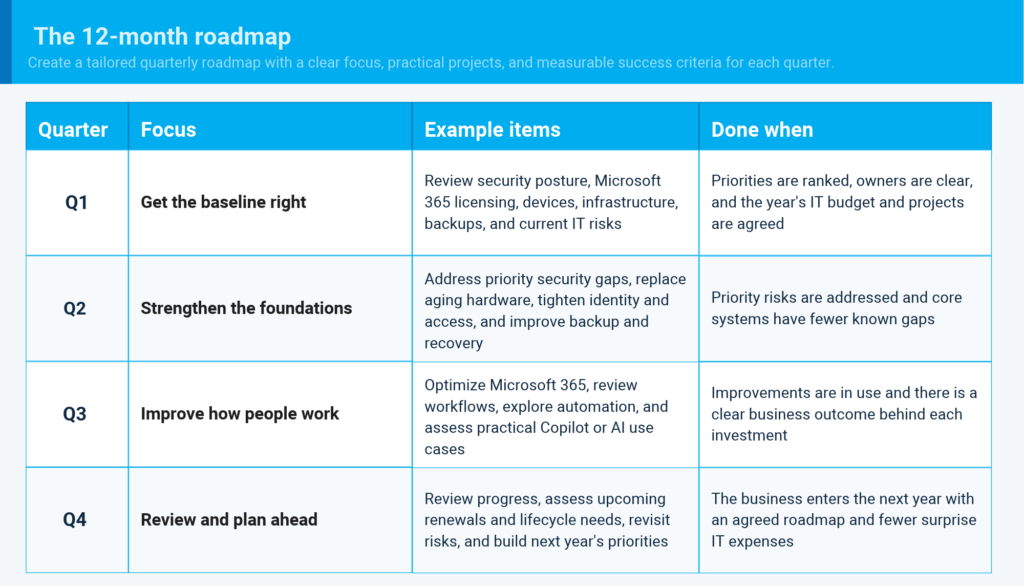
The quarters themselves aren’t rules. A business planning an office move in April or replacing critical infrastructure in September will obviously organize things differently.
What matters is having a view of what needs to happen, why it matters, when it should happen, and what success looks like.
The roadmap shouldn’t disappear into a folder once it’s approved, either. Review it at least quarterly. Projects move, budgets change, new risks emerge, and business priorities rarely wait politely for the next planning cycle.
A useful roadmap is designed to change with them.
What should you own?
Not every IT capability needs a full-time role. The better question is where your business needs permanent ownership and where it simply needs access to the right expertise.
For most growing businesses, that means one of three approaches:
- Fully managed IT: Day-to-day support, security, planning, and IT operations are managed by an external partner.
- Co-managed IT: Your internal IT team stays in control, with added capacity or specialist expertise in areas such as Microsoft 365, Azure, cybersecurity, or cloud.
- Specialist support: Bring in expertise for a specific need, such as a Microsoft 365 project, Azure migration, cybersecurity assessment, Copilot rollout, or infrastructure refresh.
The right model isn’t about outsourcing more. It’s about having the right expertise available without building every capability in-house.
5 steps to get more from managed IT
Here’s a practical five-step framework for getting more from managed IT: better visibility, clearer priorities, and a plan for what’s coming next.
Step 1: Get a clear picture of where IT stands today
That means understanding your devices, infrastructure, Microsoft 365 environment, licensing, security controls, backups, applications, vendors, and upcoming renewals.
The goal isn’t documentation for documentation’s sake. It’s knowing what’s working, what’s approaching end of life, where there are avoidable risks or costs, and what actually deserves attention.
Step 2: Connect IT priorities to the business plan
Hiring 30 people? Opening another location? Pursuing larger customers with tougher security requirements? Moving more workloads to Azure? Considering Microsoft Copilot? Those plans should show up in the IT roadmap before they become urgent requests.
Map upcoming business plans to the technology, security, budget, and support they will require. That way, IT is ready for growth rather than catching up with it.
Step 3: Put the next 12 months on the roadmap
Decide what needs to happen this quarter, what can wait, what it is likely to cost, who owns it, and what success will look like.
Some projects will reduce risk. Others will replace aging technology, improve productivity, prepare for growth, or make better use of investments you’ve already made.
Step 4: Bring in expertise where it makes sense
Your internal team may know the business extremely well but need additional experience in cybersecurity, Azure, Microsoft 365, Copilot, cloud infrastructure, or a major project. Another business may be better served by having its day-to-day IT managed externally.
Neither approach is automatically better.
The goal is to be deliberate about what you want to own internally and where specialist expertise makes the business stronger.
Step 5: Review, measure, and adjust
Come back to the roadmap regularly. Look at what was completed, what changed, which risks remain, where costs are moving, and whether completed projects delivered the result you expected.
Use each quarterly review to reprioritize the next three months. Bring forward what has become important, push back what can wait, and update the budget as the business changes.
What's next shouldn't be a surprise

No 12-month technology roadmap survives 12 months completely unchanged.
That’s not the goal. The value is knowing what’s coming, what you’re investing in, and where priorities need to move as the business grows.
Good IT support keeps the business running today. Good managed IT also helps you prepare for what’s next.
Ready to look beyond the ticket queue? iwx can help you build a practical 12-month IT roadmap around where your business is going next.