





The best time to find a vulnerability in your network is before an attacker does. The second best time is right now: not after a breach, not during an audit, and definitely not when a customer is asking why their data was compromised.
Network penetration testing is exactly what it sounds like: ethical hackers breaking into your network on purpose to find the weak points before someone else does. It’s proactive, it’s deliberate, and for businesses in Chicago’s fast-moving tech and business sectors, it’s no longer optional.
The landscape has shifted. Attackers are moving faster, i.e., generating exploits at scale, adapting mid-attack, and operating with a level of automation that traditional defenses weren’t built for. The good news? The tools and tactics on the defensive side are evolving just as quickly. Penetration testing today isn’t just about running scans and handing over a report. It’s about continuous, adaptive assessment that keeps pace with the speed of modern threats.
This post highlights the role penetration testing tools play in fortifying security measures and protecting businesses from potential threats – with a look at what’s changed, what to look for, and how to prepare.
What is network penetration testing?

Network penetration testing is a focused form of ethical hacking that targets a company’s entire computer network. The goal is simple: uncover vulnerabilities before attackers do.
This process includes an in-depth evaluation of network security measures through external tests (attacking from outside the network) and internal tests (simulating an insider threat), such as web application testing and mock phishing attacks.
Pen testers use a variety of tools and methodologies such as port scanning, network mapping, vulnerability scanning, and scripted exploit attempts to answer three questions:
- Where are the weak points?
- How far could an attacker get if they found one?
- How long could they stay undetected?
The answers give you a roadmap for closing gaps before someone else finds them.
Types of penetration testing
Not all pen tests are created equal. The type you choose depends on what you’re trying to learn and how much you want to simulate a real-world attack.
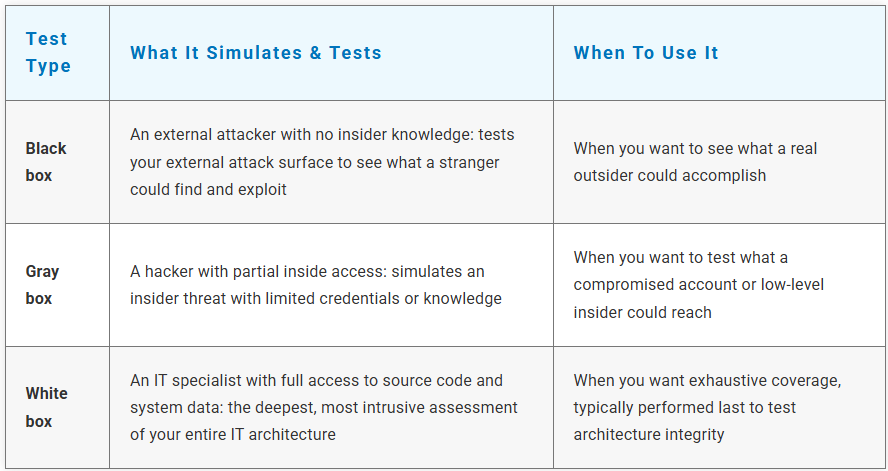
| Test type | What it simulates & tests | When to use it |
|---|---|---|
| Black box | An external attacker with no insider knowledge: tests your external attack surface to see what a stranger could find and exploit | When you want to see what a real outsider could accomplish |
| Gray box | A hacker with partial inside access: simulates an insider threat with limited credentials or knowledge | When you want to test what a compromised account or low-level insider could reach |
| White box | An IT specialist with full access to source code and system data: the deepest, most intrusive assessment of your entire IT architecture | When you want exhaustive coverage, typically performed last to test architecture integrity |
Most businesses benefit from a combination – starting broad with black box, then going deeper with gray or white box as they mature.
What to look for in penetration testing tools
Choosing the right penetration testing tools directly contributes to strengthening your network’s defenses. Here’s what matters now:
- Comprehensive coverage. The tool should scan for the full range of common attack surfaces: open ports, misconfigurations, outdated software, weak credentials, and web application vulnerabilities.
- Clear, actionable reporting. A list of 500 vulnerabilities is useless if you can't prioritize. Look for tools that rank findings by real risk, not just severity scores, and give you a clear path to remediation.
- Context-aware assessment. This is where things have changed. Modern tools don't just flag vulnerabilities; they reason over context. How does this weakness connect to other weaknesses? Could an attacker chain them together? What's the actual path to a breach? Tools that can connect the dots give you a far more accurate picture of your real exposure.
- Continuous, adaptive testing. The old model was point-in-time: run a test, get a report, fix the issues, repeat next year. That worked when threats moved slowly. Today's tools increasingly support continuous assessment: monitoring for new vulnerabilities as your environment changes, not just on a schedule. The shift from "snapshot" to "ongoing" is one of the most significant changes in the field.
- Automation that augments, not replaces. The best tools now handle the repetitive work, e.g., scanning, initial triage, pattern recognition, so your security team can focus on the findings that require human judgment. Automation without oversight is a risk. Automation with oversight is a competitive advantage.
Trusted penetration testing tools
Several penetration testing tools have been embraced by security experts for their efficacy in preventing cyberattacks. Here’s a selection of reliable tools and how they’ve evolved:
-
Nmap
Provides detailed scans to identify open ports and vulnerabilities, offering an early warning system for network security. Long the industry standard for network mapping, it remains the starting point for most assessments. -
Metasploit
A powerful framework used to test exploits and understand potential attack pathways hackers might use. Now widely used to simulate complex, multi-stage attacks that mirror how real adversaries operate. -
Nessus
Thoroughly assesses systems for known vulnerabilities, helping businesses proactively address risks. Its prioritization capabilities have become more sophisticated, helping teams focus on what actually matters rather than drowning in alerts. -
Burp Suite
A favorite for testing web applications, identifying coding vulnerabilities, and strengthening security for web-based systems. Increasingly used to test how web applications hold up against adaptive, automated attack techniques. -
OWASP ZAP
Open-source and user-friendly, it identifies security weaknesses in web environments. A strong starting point for businesses that want to assess web application security without a heavy investment. -
Microsoft Defender for Cloud
Continuously assesses your cloud and hybrid environments for vulnerabilities, misconfigurations, and security gaps. It bridges the gap between pen testing and ongoing defense - flagging weak spots in real time and providing actionable remediation steps, so the findings from a pen test don't just sit in a report. -
Microsoft Sentinel
A cloud-native SIEM and SOAR platform that ties pen testing insights into your broader security operations. It correlates signals across your entire environment, uses AI to detect anomalies, and automates responses - turning one-time pen test findings into continuous, adaptive defense. - Microsoft Defender for EndpointDelivers endpoint detection and response across your network, closing the loop between what a pen test finds and what your day-to-day defense actually catches. With AI-driven behavioral analysis, it watches for the same attack patterns a pen tester simulates 24/7.
These tools remain the backbone of most pen testing engagements. What’s changed is how they’re used – increasingly layered with automation, context analysis, and continuous monitoring to keep pace with faster, smarter threats. And for businesses already invested in Microsoft’s ecosystem, Defender and Sentinel bring pen testing insights directly into the security operations you’re already running.
How to prepare for a pen test: A practical guide
Whether it’s your first pen test or your tenth, preparation makes the difference between a useful exercise and a checkbox activity. Here’s how to get ready:
- Define your scope. What systems, applications, and networks are being tested? What's off-limits? Be specific. A pen test that tests everything tests nothing well.
- Choose your test type. Based on your goals, decide on black box, gray box, white box, or a combination. If you're not sure, start with black box to see your external exposure, then go deeper.
- Brief your team. Make sure key stakeholders know the test is happening, when it's happening, and what to expect. Surprising your own IT team with a simulated attack rarely goes well.
- Set success metrics. What does a successful pen test look like for your business? Is it finding zero critical vulnerabilities? Identifying your top three risks? Having a clear remediation plan within 30 days? Define this before you start.
- Review results with intent. Don't just file the report. Walk through findings with your security team or provider, understand the real risk behind each vulnerability, and prioritize fixes based on actual exposure, not just severity labels.
- Close the loop. The most valuable pen test is the one that leads to action. Assign owners to each finding, set deadlines, and schedule a follow-up assessment to verify the fixes held.
Strengthen your network security with iwx

Penetration testing has always been about finding your weak points before someone else does. What’s changed is the speed, sophistication, and automation on both sides of the equation. The businesses that stay secure aren’t the ones with the most tools: they’re the ones who test continuously, remediate quickly, and treat security as an ongoing practice rather than an annual event. Let iwx enable you find the gaps before attackers do, and close them before they become a story.
Sources: IBM (Network Penetration Testing); SANS Institute (Securing AI; Travelers Cybersecurity Report); World Economic Forum Global Cybersecurity Outlook 2026