





Microsoft’s Work Trend Index put it plainly: employees have a new “worth it” equation, and there’s no going back. Flexible, fluid, and fiercely here to stay: that’s the shape of work from the Loop to Lincoln Park and every suburban home office in between.
With 52% of US employees working hybrid and up to 40% of AI productivity gains going unrealized across organizations, one thing is clear: having Microsoft 365 isn’t the same as mastering it. Is your setup built for what work looks like now?
Let’s walk through how to get the most out of your Microsoft 365 environment.
Microsoft Teams: Your central hub for collaboration
Teams is more than a video conferencing tool. It’s your organization’s virtual workspace – and when configured with intention, it sharpens collaboration instead of scattering it.
Structuring channels for efficiency
Think of channels as rooms in a house. If everything goes in the living room, nobody finds anything. Give each conversation its own space and suddenly people know exactly where to go.
App integrations
The magic happens when your tools stop being separate tabs and start living inside Teams. Fewer windows open, more flow, less "Where did I save that?"
Setting meeting policies
The quiet superheroes of Teams: auto-mute on entry, lobby enforcement, recording restrictions. They do the policing, so you don't have to be the one asking people to mute themselves.
OneDrive: Your reliable cloud storage
OneDrive gives your team secure, accessible file storage across devices; but, default settings only get you so far when your workforce splits its week between downtown desks and kitchen tables.
Optimizing sync settings
Files On-Demand is the unsung hero of hybrid work: your files are there when you need them and not hogging your hard drive when you don't. Full sync for the desktop, cloud-only for everything else.
Sharing and permissions
Granular enough to be dangerous in the best way. Restrict external sharing, set links to expire, grant view-only access. A little configuration here saves a lot of "Wait, who has this file?" later.
Utilizing version histor
Your time machine. Someone overwrote the wrong paragraph? Roll it back. The client liked Tuesday's version better? Restore it in two clicks. The feature you never think about until the moment you desperately need it.
SharePoint: Streamlining document management
SharePoint is where organization-wide workflows live. Its flexibility is its superpower (and its biggest risk). Without structure, it becomes a digital junk drawer.
-
Creating intuitive site structures
Good SharePoint architecture is like good office signage: people shouldn't need a map to find what they're looking for. Structure sites by department, project, or function, and let the layout do the thinking. -
Enhancing document searchability
Metadata and tagging turn SharePoint from a filing cabinet into a search engine. Tag your documents properly and retrieval goes from "Where did I save that?" to instant. -
Automating workflows
Power Automate is where repetitive tasks go to die. If someone is doing it manually more than once a week, it belongs in a workflow. Every automation is time back in your team's day.
Copilot: Your AI partner across industries
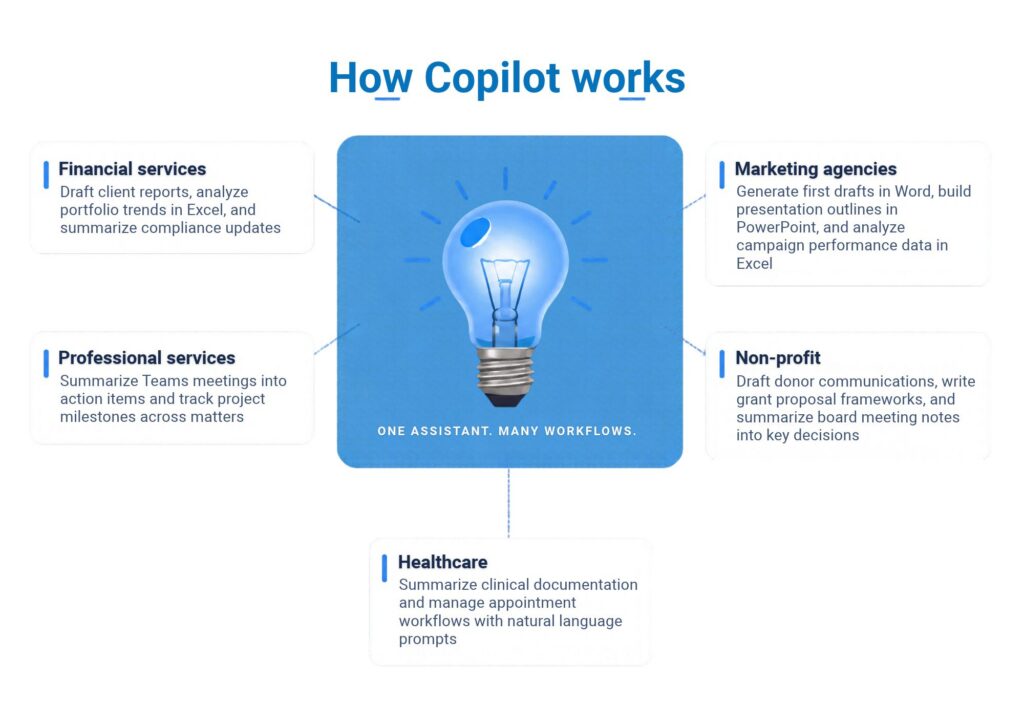
Copilot has evolved from a helpful assistant to an embedded AI partner across the entire Microsoft 365 suite. With agents, autonomous workflows, and deeper integration into Teams, Word, Excel, and PowerPoint, Copilot is now woven into the fabric of daily work (not parked on the side waiting to be called).
Azure Virtual Desktop: Secure access from anywhere
Not every app lives in the cloud, and not every team member should have full desktop access from every location.
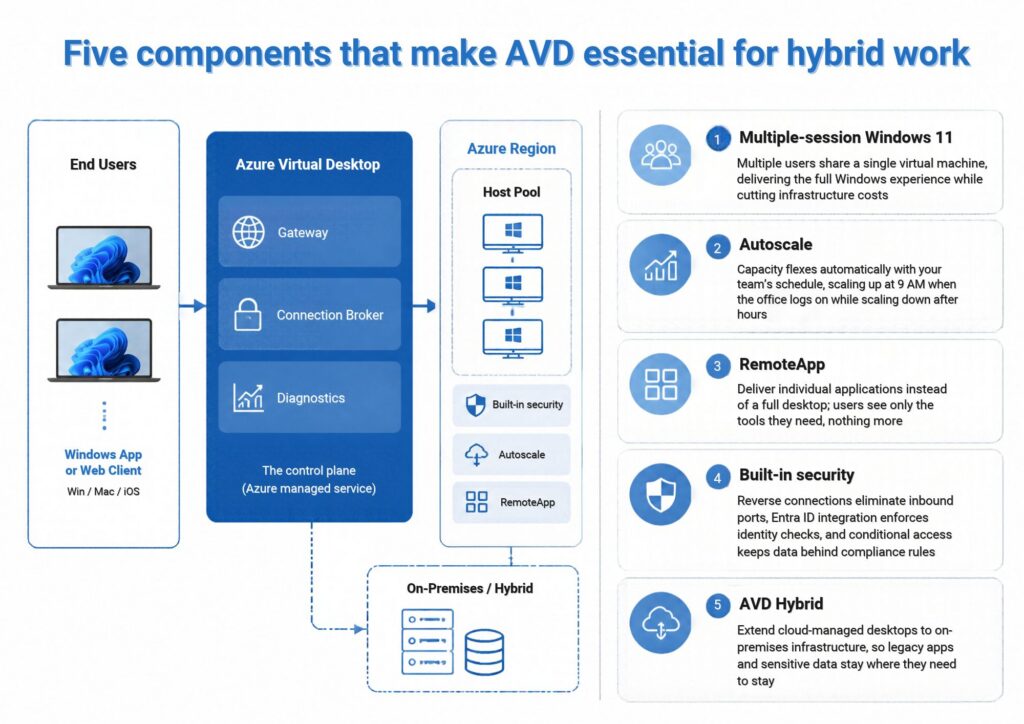
Azure Virtual Desktop (AVD) bridges that gap, giving your hybrid workforce secure, virtualized access to the apps and desktops they need, from wherever they are.
Five questions to ask about your hybrid setup
-
Is your network keeping up with where your people actually work?
A hybrid team split between a downtown office and a suburban home office needs consistent performance on both ends. Audit your bandwidth across locations (not just headquarters). Consider SD-WAN or direct routing for Teams meetings to reduce latency. If someone on a Metra train can't join a client call without dropping, that's a network problem, not a patience problem. -
Are your collaboration tools helping or just adding noise?
If you're running Teams alongside Slack, Zoom, and three project management apps, you've got tool sprawl. Conduct a quarterly tool audit. Identify what's actually used. Consolidate. Microsoft 365 was built to be the single pane of glass — Teams for communication, SharePoint for documents, Planner for tasks, OneDrive for files. Use it that way and watch the noise drop. -
Can you confidently say your data is secure across every device?
This isn't about turning your IT team into a security operations center. It's about good housekeeping. Enable Conditional Access policies in Microsoft Entra ID. Require multi-factor authentication for external sharing. Set device compliance rules so a personal laptop in a coffee shop can't download your finance team's quarterly projections. These are baseline configurations, not enterprise-grade investments. -
Is your team actually using Copilot, or just paying for it?
Adoption doesn't happen by license assignment. Up to 40% of AI productivity gains go unrealized because organizations skip the human side of rollout. Identify two or three power users per department. Train them on real workflows (not generic demos). Let them champion it internally. The fastest path to organization-wide adoption is peer proof, not policy memos. -
Is your team actually using Copilot, or just paying for it?
Adoption doesn't happen by license assignment. Up to 40% of AI productivity gains go unrealized because organizations skip the human side of rollout. Identify two or three power users per department. Train them on real workflows (not generic demos). Let them champion it internally. The fastest path to organization-wide adoption is peer proof, not policy memos. -
When was the last time you audited your Microsoft 365 licenses?
Unused licenses are silent budget drains. Run a usage report every six months. Downgrade or reassign licenses for users who don't need premium tiers. Redirect that spend toward the tools your team actually uses - whether that's additional Copilot seats, AVD capacity, or Power Automate connectors that save hours of manual work.
Hybrid work doesn’t have to be hard work

iwx team speaks Microsoft 365 language fluently. We can help you build, optimize, and manage your work environments with the kind of hands-on, Midwest-practical expertise that turns technology into results.
References
• Statista, 2026 — Hybrid vs. remote work statistics, United States
• PwC, 2026 — Global Workforce Hopes and Fears Survey
• EY, 2025 — Work Reimagined Survey: AI productivity gaps and talent strategy