





As businesses move faster, technology can either enable progress – or slow it down.
That’s why more organizations are turning to cloud platforms like Microsoft Azure: to support growth, flexibility, and security without being constrained by traditional on‑premise infrastructure.
What Microsoft Azure is, in simple business terms
Microsoft Azure is Microsoft’s cloud platform. It gives businesses on‑demand access to computing power, storage, networking, security, analytics, and AI. Instead of owning and maintaining hardware, companies can focus on using technology to support day‑to‑day operations and long‑term growth.
Overview of Azure cloud service models
Azure is typically described using three service models. You don’t need technical knowledge to understand them – they simply reflect how responsibilities are shared between your business and Microsoft.
Infrastructure as a Service (IaaS)
With IaaS, Azure provides the infrastructure – virtual servers, storage, and networking – while your business controls what runs on top of it. This model works well for businesses migrating existing systems to the cloud or those that want flexibility without redesigning applications from scratch.
Platform as a Service (PaaS)
PaaS removes much of the setup and maintenance work. Azure handles the underlying infrastructure so teams can focus on building and running applications. It’s especially useful when speed, scalability, and reduced operational effort matter more than server‑level control.
Software as a Service (SaaS)
SaaS is the most hands‑off option. The software is ready to use, and everything behind it is fully managed. Many everyday business tools follow this model, with Azure powering the services behind the scenes.
Key Azure offerings explained
Virtual machines and compute
Azure lets businesses run virtual servers in the cloud instead of on physical hardware, making it easier to scale systems as demand changes. Ask yourself:
- How quickly could your infrastructure grow during peak periods?
- What happens to your operations if a critical server fails today?
Storage and databases
Azure offers secure, scalable storage and database options for files, applications, backups, and business‑critical data. Ask yourself:
- Can your data grow without slowing down systems?
- How easily can teams access information securely from anywhere?
Networking and security
Built‑in networking and security services help protect data, manage traffic, and reduce exposure to threats. Ask yourself:
- Is security built into your systems - or added later?
- How resilient is your network during sudden spikes in demand?
Identity and access management
Azure helps control who can access systems, applications, and data – while supporting secure remote and hybrid work. Ask yourself:
- Do users have the right access without unnecessary friction?
- How clear is your visibility into permissions and access activity?
AI and analytics services
Azure supports analytics and AI capabilities that help businesses turn raw data into insight and action. Ask yourself:
- Are decisions driven by data - or intuition alone?
- What trends or risks could better analytics reveal?
How businesses like yours use Azure

Healthcare
Azure gives healthcare teams a secure place to store and access patient data – without worrying about scaling, availability, or infrastructure limits.
Best practice: Use Azure to keep patient data protected and compliant, while making sure critical systems are always available.
Law offices
Azure helps law firms keep documents, case files, and client data organized and securely accessible from anywhere.
Best practice: Centralize sensitive documents with clear access controls and reliable backup built in.
Finance and banking
Azure supports the kind of secure, resilient systems financial teams rely on – especially when data accuracy and uptime matter.
Best practice: Use Azure for secure reporting, analytics, and disaster recovery without jumping through compliance hoops.
Retail
Azure makes it easier for retailers to handle traffic spikes, transactions, and data insights without systems slowing down.
Best practice: Scale up during busy periods and use data to better understand customers and inventory.
Non‑profit organizations
Azure helps nonprofits run essential systems without the cost and complexity of maintaining physical infrastructure.
Best practice: Lower IT overhead and free up more budget for programs that drive real impact.
Marketing agencies
Azure gives agencies the flexibility to store, process, and analyze large volumes of campaign and performance data.
Best practice: Use Azure to pull campaign data into one place and deliver clearer, faster insights to clients.
Professional services (accounting and consulting)
Azure supports secure collaboration and data management for firms that handle sensitive client information every day.
Best practice: Protect client data while enabling teams to collaborate and scale advisory services with confidence.
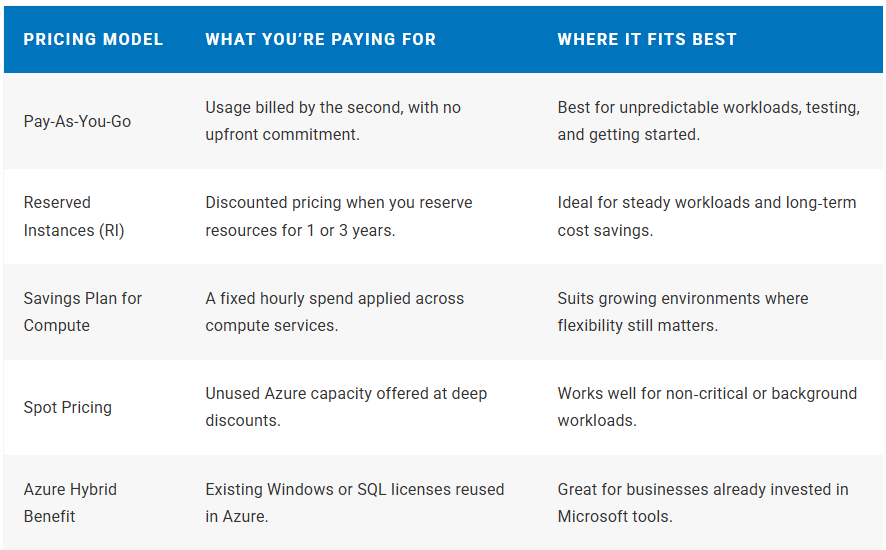
| Pricing Model | What You’re Paying For | Where It Fits Best |
|---|---|---|
| Pay-As-You-Go | Usage billed by the second, with no upfront commitment. | Best for unpredictable workloads, testing, and getting started. |
| Reserved Instances (RI) | Discounted pricing when you reserve resources for 1 or 3 years. | Ideal for steady workloads and long‑term cost savings. |
| Savings Plan for Compute | A fixed hourly spend applied across compute services. | Suits growing environments where flexibility still matters. |
| Spot Pricing | Unused Azure capacity offered at deep discounts. | Works well for non‑critical or background workloads. |
| Azure Hybrid Benefit | Existing Windows or SQL licenses reused in Azure. | Great for businesses already invested in Microsoft tools. |
Where your Azure spend really comes from
Compute
Any time cloud resources like virtual machines, containers, or apps are switched on and doing work, they’re clocking usage.
Storage
The more data you keep - and the more often you access it - the more storage costs come into play.
Networking
Costs usually show up when data moves out of Azure or travels between different regions.
Everything else
Location, performance level, operating system, and optional services can quietly shape the final bill.
FAQ about Azure pricing
Azure pricing looks complex at first – but most costs are predictable with the right setup, monitoring, and support in place.
There’s no single monthly price. Azure uses pay‑as‑you‑go pricing, so your cost depends on what services you use, how long they run, and how much capacity you consume. Small setups might cost very little, while larger production environments scale accordingly.
Yes. New Azure customers receive $200 in free credit for the first 30 days, plus access to several free services for up to 12 months. This lets businesses explore Azure before committing.
Azure won’t charge you unless you upgrade to pay‑as‑you‑go or exceed free usage limits. You’re notified when credits are running out, and you stay in control of whether to continue.
Azure offers options like:
Pay‑as‑you‑go for flexibility
- Reserved Instances for predictable workloads
- Savings Plans for ongoing compute usage
- Spot pricing for low‑priority tasks
Savings options reduce costs when workloads are predictable or long‑running. By committing to usage over time - or reusing existing licenses - businesses can significantly lower their Azure bill.
Storage costs depend on how much data you store, the storage tier you choose, and how often the data is accessed. Cold or archived data usually costs less than frequently accessed data.
Become a business enabler with Azure

At iwx, we help businesses turn Azure into something practical – secure, cost‑aware, and aligned with how you actually operate – so technology supports progress instead of slowing it down.