





October is Cybersecurity Awareness Month, and if there is one industry that should be paying attention, it is professional services.
Law firms, accountants, consultants, IT services providers, engineers, marketers – your entire business model is built on one word: trust. Clients hand you their most sensitive information and expect you to keep it locked down. But here is the catch: the way you work – fast collaboration, broad file access, remote flexibility, and now AI tools – is exactly what makes you a target.
You are not a bank with a vault. You are a firm where dozens (or hundreds) of people need access to client files, shared workspaces, and communication tools every single day. That is a lot of doors to lock. And cybercriminals? They love doors.
So let us talk about what is actually at stake, where your weak points are, and what you can do about it – without turning your firm into a fortress that nobody can get work done in.
Why professional services firms are especially exposed

The trust paradox is real. Your value proposition is “we handle your sensitive information.” But that same access is your Achilles’ heel. Here is what the numbers say:
- Professional services firms average $4.56 million per breach - above the global cross-industry average. When your product is trust, a breach does not just cost money. It costs credibility.
- The legal sector is hit even harder: $5.08 million average breach cost in 2026, up 10% year over year. Law firms are sitting on litigation files, merger details, and client communications that are worth a fortune to the wrong people.
- Nearly 19% of all ransomware incidents targeted professional services - the highest share of any industry. Not healthcare. Not finance. Professional services.
- 56% of breached law firms lost sensitive client data. That is more than half of firms that got hit watching their confidential client information walk out the door.
- 25% of law firm breaches came through a third-party vendor. The pathway most firms underestimate. You can be locked down tight and still get breached through your suppliers.
- 57% of employees use personal GenAI accounts for work, and 33% admit inputting sensitive information into unapproved tools. Your team is already using AI. The question is whether you know about it.
- 83% of organizations reported an increase in cyberattacks over the past 12 months. The trend line is not bending in a direction anyone likes.
Where your firm is most exposed
Every professional services firm has its own flavor of risk. Here are the questions we hear most often – and the practical answers that actually help.
Q1: We are a law firm. Our attorneys collaborate on client matter data and litigation files remotely all the time. How do we keep that secure without slowing everyone down?
Start with access controls that match how your firm actually works. Not everyone needs access to every matter. Role-based permissions let you give each attorney access to only the files they need – and nothing more. Add encryption for files at rest and in transit, and make sure your audit trails are turned on. If something goes wrong, you need to know who touched what and when. The goal is not to make collaboration harder. It is to make it secure by default so your team can keep moving without thinking about it.
Q2: Tax season is chaos. The volume of sensitive client data we handle - SSNs, bank details, tax records - goes through the roof. What should we be doing differently during peak periods?
Two words: temporary access. During tax season, you probably bring on seasonal staff or give existing team members broader access to client records. That is exactly when exposure spikes. Use time-limited access permissions that expire automatically after the season ends. Add data loss prevention (DLP) to flag when sensitive information like SSNs or bank account numbers is being shared outside approved channels. And make sure MFA is non-negotiable for everyone – seasonal staff included. Tax season is stressful enough without adding “we got breached” to the list.
Q3: We are an MSP. We secure our clients all day long. But who is securing us? It feels like the cobbler whose children have no shoes.
You are not wrong, and you are not alone. IT services firms are some of the most attractive targets out there because one breach at your shop can cascade across every client you manage. This is where zero trust architecture matters most. Every connection – internal and external – should be verified. Continuous monitoring is not optional when your clients’ security depends on your own. And do not skip the basics: patch management, MFA on everything, and segmented access so a breach in one client environment cannot bleed into another.
Q4: Our consultants work across shared workspaces and handle proprietary client business models, org charts, and strategy docs. How do we protect that kind of intellectual capital?
Data classification is your friend here. Not all documents are created equal – a meeting agenda does not need the same protection as a client’s five-year growth strategy. Classify your data by sensitivity level and apply protection accordingly. Use workspace governance to control who can share what with whom, and set up alerts for unusual download or sharing activity. Your consultants are going to collaborate. Just make sure the really sensitive stuff has guardrails around it.
Q5: We are an engineering firm. Our design files, blueprints, and manufacturing workflows are our IP. What is the biggest risk we are probably not thinking about?
File-level permissions and version control security. Your design files are your crown jewels, but most firms treat them like shared documents anyone can grab. Implement file-level permissions so only the project team has access. Secure your version control systems – a lot of IP theft happens through poorly secured repositories. And watch for unusual large-file downloads, especially outside business hours. If someone is downloading your entire design library at 2 AM, that is not a late-night productivity push. That is a problem.
Q6: We run a marketing agency. Our team manages client brand assets, campaign data, and social media accounts across a distributed team. What should we be worried about?
Credential management and social account MFA. Your team probably has login access to dozens of client social accounts, ad platforms, and analytics tools. If one team member’s credentials get compromised, every client account they can touch is at risk. Use a credential management system – no shared passwords, no passwords in spreadsheets. Turn on MFA for every social and ad platform that supports it (and switch off the ones that do not). And revoke access immediately when a team member leaves. The last thing you want is a former contractor posting from a client’s LinkedIn account.
Q7: Our team is already using AI tools - ChatGPT, Copilot, whatever is fastest. We have no policy. Is that actually a problem?
It is not a problem yet. It becomes one the moment someone pastes a confidential client document into a consumer AI chatbot. Here is the thing: your team is not being reckless. They are trying to work faster, and AI helps. The fix is not to ban AI – it is to channel it. Put a simple AI usage policy in place. Publish an approved tools list. Monitor for unapproved usage. And give your team sanctioned AI tools that are secure, logged, and governed. You want them using AI. You just want them using it safely.
What to prioritize
Based on the risks above, here is a practical action plan – mapped to each risk area so you know exactly where to start:
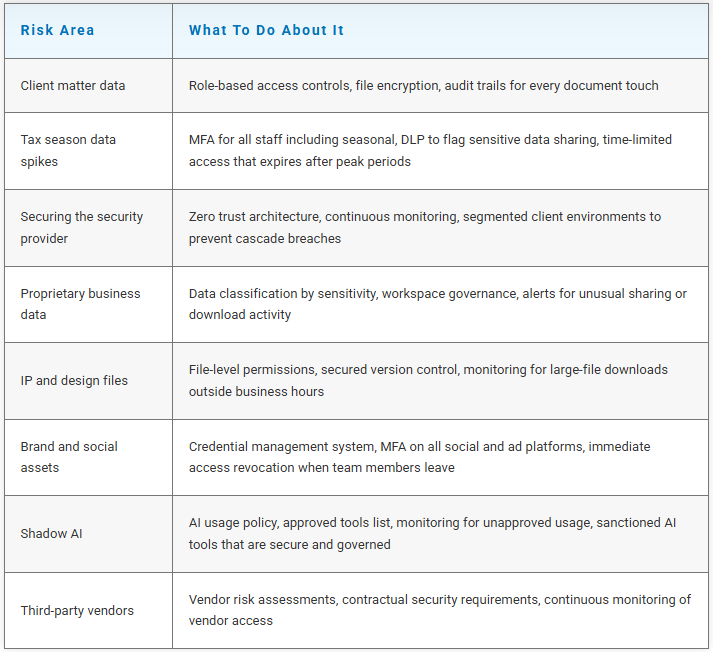
| Risk area | What to do about it |
|---|---|
| Client matter data | Role-based access controls, file encryption, audit trails for every document touch |
| Tax season data spikes | MFA for all staff including seasonal, DLP to flag sensitive data sharing, time-limited access that expires after peak periods |
| Securing the security provider | Zero trust architecture, continuous monitoring, segmented client environments to prevent cascade breaches |
| Proprietary business data | Data classification by sensitivity, workspace governance, alerts for unusual sharing or download activity |
| IP and design files | File-level permissions, secured version control, monitoring for large-file downloads outside business hours |
| Brand and social assets | Credential management system, MFA on all social and ad platforms, immediate access revocation when team members leave |
| Shadow AI | AI usage policy, approved tools list, monitoring for unapproved usage, sanctioned AI tools that are secure and governed |
| Third-party vendors | Vendor risk assessments, contractual security requirements, continuous monitoring of vendor access |
Secure collaboration without slowing down

Nobody hired you to be a security expert. You were hired to practice law, crunch numbers, design buildings, build brands, and advise clients. Security is supposed to be the thing that runs in the background so you can do all of that without thinking about it.
That is where iwx comes in. As a Microsoft Partner, we help professional services firms build security that fits how they actually work – not how a textbook says they should. Whether you need a security assessment, a zero trust roadmap, or just someone to tell you whether your current setup is actually protecting you, we are the team to call.
Sources
1. Cost of a Data Breach Report 2025/2026 – IBM and Ponemon Institute
2. Top Cybersecurity Trends for 2026 – Gartner
3. 2026 Cybersecurity and Technology Risk Survey – KPMG
4.Shadow AI is Already Here (2025) – KPMG
5. CEO Outlook 2025 – KPMG
6. Global Cybersecurity Outlook 2026 – World Economic Forum
7. AI Security Explained: Actions Leaders Should Take Now (2026) – EY
8. 2026 Data Security Incident Response Report – BakerHostetler
9. Cybersecurity TechReport – American Bar Association
10. Cyber Liability for Law Firms and Accounting Practices (2026) – SICA Insurance and Financial Services
11. 2026 Data Breach Investigations Report (DBIR) – Verizon
12. Cybersecurity Awareness Month 2026 – National Cybersecurity Alliance and CISA